
Service Providers Search API
Introduction
This document describes the Scalepoint Service Providers Search API. This API can be used to search service providers from Scalepoint solutions (HUB Motor, HUB Property, ClaimShop, HUB Health, etc), for example, as a part of FNOL flow implemented by insurance company.
Main consumer of this API is insurance company.
Overview
The process of searching service providers can be divided into two steps:
- Authentication
- Search request
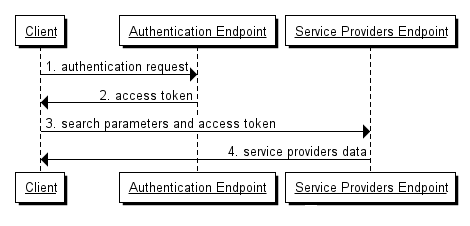
Authentication
You need an access_token in order to send data to the Service Providers Endpoint. This access token can be obtained from the Authentication Endpoint. Please refer to the documentation about details of authentication process.
API caller should request platform-service-provider:read scope from Authentication Endpoint.
Endpoints
Service Providers Search API endpoint
The endpoint which allows to search service providers is in the following format:
https://www.scalepoint.com/api/integration/data/<version>/<country>/<tenant>/service-providers?<query string parameters>
Service providers search request data presented as query string parameters.
The actual format of this will depend on the insurance company, the country in which it operates and the version of the API.
Assuming the following:
- Country:
Denmark - Tenant:
ABC Insurance - Other brands:
Budget Insurance
The endpoint could look something like this:
https://www.scalepoint.com/api/integration/data/v1/dk/abcinsurance/service-providers?company=abcinsurance&serviceType=vehicleRepair&vehicle.licensePlateNo=CW42822&address.postalCode=6200&policy.serviceLevel=Basic&propertyCode=1102
Property example (v1):
https://www.scalepoint.com/api/integration/data/v1/dk/abcinsurance/service-providers?company=abcinsurance&serviceType=property&profession=Plumber&postalCode=6200
Health example (v1):
https://www.scalepoint.com/api/integration/data/v1/dk/abcinsurance/service-providers?company=abcinsurance&serviceType=health&treatmentType=MentalTreatment&postalCode=6200
For testing purposes, you will be given access to a project server and the hostname-part of the endpoint would change accordingly:
https://<hostname>/api/integration/data/v1/dk/abcinsurance/service-providers?company=abcinsurance&serviceType=vehicleRepair&vehicle.licensePlateNo=CW42822&address.postalCode=6200&policy.serviceLevel=Basic&propertyCode=1102
Please discuss with your account manager, which project server you have been assigned in order to determine the actual endpoint.
Service Providers Search
Service Providers Search Request
Search Service Providers GET request contains query string parameters and authorization header. Fields are described in Appendix A and C.
Authorization header has name 'Authorization'. It has value built from access_token in following format:
Bearer access_token
Note the important space character between Bearer and access_token value.
Service Providers Search Response - V1
Response contains basic service providers info in JSON format in case of success (HTTP status code 200). Fields are described in Appendix B - V1 and C.
Simplest successful response example for vehicle repair:
{
  "serviceType": "vehicleRepair",
  "serviceProviders": [
  {
        "externalId": "a.06317562-7f4a-4c7e-9ee4-eae06e590c37",
        "name": "Serviceprovider name",
        "country": "dk",
        "postalCode": "1964",
        "distance": 0,
        "address": "Ingemannsvej 9",
        "city": "Frederiksberg C",
        "email": "abc@repairshopbrand.dk",
        "phone": "12 34 56 78",
        "status": "Red",
        "statusDescription": "Serviceprovider is very busy at the moment",
        "isExternal": false
  },
  {
        "externalId": "a.12345678-7f4a-4c7e-9ee4-eae06e590c37",
        "name": "Another serviceprovider name",
        "country": "dk",
        "postalCode": "1964",
        "distance": 3,
        "address": "Ingemannsvej 3",
        "city": "Frederiksberg C",
        "email": "cba@anotherrepairshop.dk",
        "phone": "87 65 43 21",
        "status": "Green",
        "statusDescription": "Serviceprovider is not loaded.",
        "isExternal": true,
        "supplierAccountNo": "L45850505"
  }
  ],
  "vehicle" : {
    "brand": "Mercedes",
    "model": "CLS 350"
  }
}
Simplest successful response example for property:
{
  "success": true,
  "payload": {
    "serviceType": "property",
    "serviceProviders": [
      {
        "externalId": "5505715f-d80b-46bb-9463-bbf1ba3de4e1",
        "name": "SP 1",
        "phone": "+4512345678",
        "email": "craftsman_company_email@example.com",
        "commercialTaxId": "43726223",
        "distance": 1,
        "contacts": [
          {
            "name": "craftsman_name Last"
          }
        ],
        "address": {
          "country": "DK",
          "city": "Frederiksberg C",
          "postalCode": "1964",
          "street1": "Ingemannsvej 9",
          "street2": ""
        },
        "isExternal": false
      }
    ],
    "total": 8
  }
}
Simplest successful response example for health:
{
  "success": true,
  "payload": {
    "serviceType": "health",
    "serviceProviders": [
      {
        "externalId": "4d61f95f-011b-e711-8105-005056bb6611",
        "name": "Autotest company",
        "phone": "+45 12 23 32 24",
        "email": "jr.company.auto_company_email@example.com",
        "description": "",
        "commercialTaxId": "19283740",
        "distance": 1,
        "address": {
          "country": "dk",
          "city": "Frederiksberg C",
          "postalCode": "1964",
          "street1": "Ingemansvej 9",
          "street2": ""
        },
        "isExternal": true,
        "organization": "Autotest company"
      }
    ],
    "total": 7
  }
}
In case of error response JSON can be ignored - instead HTTP status code should be used to determine error type.
From business point of view, most of the data are intended to be present for end-user, and service provider identifier should be sent within following Create Case endpoint call (during FNOL flow) to assign selected service provider to a case.
Service Providers Search Response - V2
Main difference comparing to the previous version is more extended information, also some data restructuring (ex. new 'address' property grouping related address fields).
Response contains basic service providers info in JSON format in case of success (HTTP status code 200). Fields are described in Appendix B - V2 and C.
Simplest successful response example:
{
  "serviceType": "vehicleRepair",
  "serviceProviders": [
    {
      "externalId": "a.80288d4a-322f-48bc-9051-d546460eca07",
      "name": "Repairshop Name",
      "phone": "12 34 56 78",
      "fax": "87 65 43 21",
      "email": "abc@mail.dk",
      "description": "Peugeot",
      "competences": "",
      "commercialTaxId": "11112222",
      "distance": 0,
      "externalSystemId": "32343",
      "isExternal": true,
      "organization": "Organization name",
      "lastModificationDate": "2018-07-18T15:58:43Z",
      "workSchedule": {
        "monday": "08:00 - 16:00",
        "tuesday": "08:00 - 16:00",
        "wednesday": "08:00 - 16:00",
        "thursday": "08:00 - 16:00",
        "friday": "08:00 - 15:00",
        "saturday": "Lukket",
        "sunday": "Lukket"
      },
      "contacts": [
        {
          "name": "Peter Hansen"
        },
        {
          "name": ""
        }
      ],
      "closedCasesStatistics": {
        "totalCases": 100,
        "totalCasesLastYear": 0
      },
      "availability": {
        "status": "G",
        "vacation": false,
        "description": "Short waiting time"
      },
      "address": {
        "street1": "Vestvejen 99",
        "street2": "",
        "postalCode": "9999",
        "city": "Aabenraa",
        "country": "dk"
      },
      "paymentMethods": [
        {
          "type": "bankAccount",
          "branchNumber": "9999",
          "accountNumber": "9999999"
        }
      ],
      "specialties": {
        "carBrands": [
          {
            "name": "Peugeot",
            "authorized": false
          },
          {
            "name": "Audi",
            "authorized": true
          },
          {
            "name": "VW",
            "authorized": false
          }
        ]
      }
    },
    {
      "externalId": "a.8bec2f08-7482-4312-adf5-5635c6540c8f",
      "name": "Another repairshop name",
      "phone": "11 22 33 44",
      "fax": "",
      "email": "cba@mail.com",
      "description": "Eurogarant godkendt",
      "competences": "",
      "commercialTaxId": "98765432",
      "distance": 0,
      "externalSystemId": null,
      "isExternal": false,
      "organization": "Organization name",
      "lastModificationDate": "2018-07-18T15:58:43Z",
      "bankBranchNumber": "9999",
      "accountNumber": "9999999",
      "supplierAccountNo":"L45850505",
      "workSchedule": {
        "monday": "08:00 - 16:30",
        "tuesday": "08:00 - 16:30",
        "wednesday": "08:00 - 16:30",
        "thursday": "08:00 - 16:30",
        "friday": "08:00 - 16:30",
        "saturday": "Lukket",
        "sunday": "Lukket"
      },
      "contacts": [
        {
          "name": "Bo Hansen"
        },
        {
          "name": ""
        }
      ],
      "closedCasesStatistics": {
        "totalCases": 250,
        "totalCasesLastYear": 0
      },
      "availability": {
        "status": "R",
        "vacation": false,
        "description": "Repairshop is very busy at the moment"
      },
      "address": {
        "street1": "Kathale 99",
        "street2": "",
        "postalCode": "9999",
        "city": "Aabenraa",
        "country": "dk"
      },
      "paymentMethods": [
        {
          "type": "bankAccount",
          "branchNumber": "9999",
          "accountNumber": "9999999"
        }
      ],
      "specialties": {
        "carBrands": [
          {
            "name": "All",
            "authorized": false
          }
        ]
      }
    }
  ],
  "vehicleInfo": {
    "brand": "Mercedes",
    "model": "CLS 350",
    "year": 2014
  },
  "total" : 20,
  "serviceLevelMatch": true
}
In case of error response JSON can be ignored - instead, HTTP status code should be used to determine error type.
From the business point of view, most of the data are intended to be present for end-user, and service provider identifier should be sent within following Create Case endpoint call (during FNOL flow) to assign selected service provider to a case.
Appendix A-v1 – Request data description
| Query parameter | Description | Support |
|---|---|---|
| company | Specific company or brand |
|
serviceType | The serviceType determines the kind of service providers you are searching for. Supported values are: "vehicleRepair", "property", "health". |
|
| vehicle.licensePlateNo | The licenseplate of the vehicle. Should be specified without any punctuation. Used to identify car brand, model and other car properties, then it could be used, for example, to filter out repairshops that do not provide repair certain cars. |
|
| address.postalCode | Postal / zip code to look for the nearest service providers. |
|
| policy.serviceLevel | Service level is used to determine what kind of service a customer has purchased. Examples: "Basic", "Silver", "Gold" |
|
| propertyCode | A property code is an extra code that is linked to the vehicle type and which can be used in HUB Motor to select certain repairshops over others. The property codes have to be defined in HUB Motor beforehand. |
|
| includeExternal | Indicates whether to return external service providers in addition to internal ones (which are part of IC company network). By default, only internal service providers are returned. |
|
| maxResultsCount | Maximum results count is self explayning property name used to set maximum number of results to return. The property's maxResultsCount value is used specifically for the case when search for service providers without postalCode and number of results potentially can be big. When address.postalCode parameter is present in request, this paramter is omitted. When making a request without address.postalCode and maxResutlsCount is also unspecified, then all service providers should be returned (depends on includeExternal). | |
postalCode | Postal / zipcode to look for the nearest service providers. |
|
| profession | Name of the searched profession. Examples: None, Plumber, Sewer, Carpenter, Electrician, Glazier, Bricklayer, DamageService, WhiteGoodsTechnician, Painter, Roofing, TotalEnterprise, GateMaintenence, DryRotAnalysis, PestControl, FloorFitter, PipelineDredging, MainContractor, Gardener, RefrigerationEngineer, Consultancy, MoistureTechnique, LeakDetection. |
|
| claimSector | Name of the searched sector. Examples: Private, Public. |
|
| treatmentType | Type of treatment. List of allowed values depends on customer and on what has been set in external system. Examples: HospitalTreatment, Examination, MentalTreatment, PhysicalTreatment, OtherHealthcareServices, AbuseTreatment. |
|
| organizationName | Name of the organization that service partner belongs in. |
|
| treatmentTypeText | Service provider treatment type as text. |
|
| specialitiesText | Type of speciality. List of allowed values depends on customer and on what has been set in external system. |
|
| search | Service provider name or part of it that we want to find. |
|
Appendix A-v2 – Request data description
| Query parameter | Description | Support |
|---|---|---|
| company | Specific company or brand |
|
serviceType | The serviceType determines the kind of service providers you are searching for. Supported values are: "vehicleRepair", "property", "health". |
|
| vehicle.licensePlateNo | The license plate of a vehicle. Should be specified without any punctuation. Used to identify car brand, model and other car properties, then it could be used, for example, to filter out repairshops that do not provide repair certain cars. |
|
| vehicle.brandName |
Brand name. Used to filter out service providers and return just the ones who provide services for the specified brand. When the car brand is not specified on the request (neither passed via * The API will not try to recognize the car brand from its license plate if |
|
| vehicle.year | Car model year. Used in the search logic to select repair shops that have limitation for repaired car age. |
|
| vehicle.serviceProviderName | Service provider name filter option is used to filter out service providers by the name | |
| address.postalCode | Postal / zipcode to look for the nearest service providers. |
|
| address.city | City name to look for the service providers in the selected city | |
| policy.serviceLevel | Service level is used to determine what kind of service a customer has purchased. Examples: "Basic", "Silver", "Gold" |
|
| propertyCode | A property code is an extra code that is linked to the vehicle type and which can be used in HUB Motor to select certain repairshopsover others. The property codes have to be defined in HUB Motor beforehand. |
|
| modifiedSince | Modified since date indicates the date and time in ISO-8601 format and instructs a service to return service providers which were updated after the specified date. |
|
| dynamicProperty.PropertyId |
Dynamic properties are evaluated in HUB & CORE business rules. If the dynamic property evaluation failed in business rules for some service provider, the one is excluded from the result list.
Dynamic property parameter could be passed as a collection of GUIDs to the endpoint. E.g. |
|
| includeExternal | Indicates whether to return external service providers in addition to internal ones (which are part of IC company network). By default, only internal service providers are returned. |
|
| authorizedOnly |
Specifies whether to search for authorized service partners only. When using When |
|
| start | This offsets the starting point of the collection returned from the server in the response. |
|
| limit | This limits the number of results in a response collection returned from the server to a specific number. |
|
| maxResultsCount |
Maximum results count is self explayning property name used to set maximum number of results to return. The property's |
|
Appendix B-V1 – Response data description
Root
| JSON Path | Description |
|---|---|
| serviceType | The serviceType determines the kind of service you are searching for. Supported values are: "vehicleRepair", "property", "health" |
Service Providers
An array of found service providers satisfying search criteria.
| JSON Path | Description | Presence |
|---|---|---|
serviceProviders[].externalId | Service provider identifier. Used to refer to it later during case creation request - to assign a case to selected service provider. See details about format below. | |
serviceProviders[].name | Name of the service provider. This can be the name of a person or the name of a company. | optional |
| serviceProviders[].country | optional | |
serviceProviders[].postalCode | Postal / zip code of the service provider address. | optional |
| serviceProviders[].distance | Distance to the repairshop in km | optional |
serviceProviders[].address | Address of service provider location. | optional |
serviceProviders[].city | City of service provider location. | optional |
serviceProviders[].email | Contact email of service provider. | optional |
serviceProviders[].phone | Contact phone number of service provider. | optional |
serviceProviders[].status | Status of service provider. It is quite specific to each product type. For example, it can be a "Red", "Yellow" or "Green" for Motor service providers. | optional |
serviceProviders[].statusDescription | Descriptive explanation of serviceProviders[].status. | optional |
| serviceProviders[].isExternal | Defines if it is ServiceProvider which is not included into the requested network | optional |
| serviceProviders[].description | Additional information about service provider | optional |
| serviceProviders[].commercialTaxId | Commercial tax number of a service provider | optional |
| serviceProviders[].distance | Distance to the repairshop in km | optional |
| serviceProviders[].organization | Service provider organization name. | optional |
| serviceProviders[].supplierAccountNo | Internal Supplier ID | optional |
Service provider identifier format
<product_type_prefix>.<local_identifier>
Example: a.06317562-7f4a-4c7e-9ee4-eae06e590c37
All lowercase is recommended for consistency. Guids should be serialized without curly braces for the same reason.
Vehicle
It is needed for Motor because some clients of this API might use this information. They pass vehicle.licensePlateNo in request, Scalepoint identifies brand/model using 3rd party service and can provide that as extra data in response.
| JSON Path | Description | Presence |
|---|---|---|
brand | The brand of the vehicle (e.g. "BMW", "Volvo" or "Ford") |
|
| model | Model description of the vehicle (e.g. "320 Touring", "V70" or "Mondeo") |
|
| year | Model year of the vehicle. Zero if not defined. |
|
Appendix B-V2 – Response data description
Root
| JSON Path | Description |
|---|---|
serviceType | The serviceType determines the kind of service you are searching for. Supported values are: "vehicleRepair", "property", "health". |
Service Providers
An array of found service providers satisfying search criteria.
| JSON Path | Description | Presence |
|---|---|---|
serviceProviders[].externalId | Service provider identifier. Used to refer to it later during case creation request - to assign a case to selected service provider. See details about format below. | |
serviceProviders[].name | Name of the service provider. This can be the name of a person or the name of a company. | optional |
| serviceProviders[].phone | Contact phone number of a service provider. | |
| serviceProviders[].fax | Fax number of a service provider | optional |
serviceProviders[].email | Contact email of a service provider. | |
serviceProviders[].description | Description of a service provider | optional |
| serviceProviders[].competences | Competences of a service provider | optional |
| serviceProviders[].commercialTaxId | Commercial tax number of a service provider | optional |
| serviceProviders[].distance | Distance to the repairshop in km | optional |
| serviceProviders[].externalSystemId | Identifier of service provider in context of external system | optional |
| serviceProviders[].workSchedule.monday | Service provider working hours (e.g. "07:30 - 17:00") | optional |
| serviceProviders[].workSchedule.tuesday | Service provider working hours (e.g. "07:30 - 17:00") | optional |
| serviceProviders[].workSchedule.wednesday | Service provider working hours (e.g. "07:30 - 17:00") | optional |
| serviceProviders[].workSchedule.thursday | Service provider working hours (e.g. "07:30 - 17:00") | optional |
| serviceProviders[].workSchedule.friday | Service provider working hours (e.g. "07:30 - 17:00") | optional |
| serviceProviders[].workSchedule.saturday | Service provider working hours (e.g. "Lukket") | optional |
| serviceProviders[].workSchedule.sunday | Service provider working hours (e.g. "Lukket") | optional |
| serviceProviders[].contacts[].name | Service provider contact person name | optional |
| serviceProviders[].closedCasesStatistics.totalCases | Count of all closed cases | optional |
| serviceProviders[].closedCasesStatistics.totalCasesLastYear | Count of closed cases for the last year | optional |
| serviceProviders[].availability.status | Status of a service provider. It is quite specific to each product type. For example, it can be an "R" (red), "Y" (yellow) or "G" (green) for Motor service providers. Meaning: red (R) - service provider doesn't work (vacation). Yellow (Y) - long waiting time. A service provider is loaded. Green (G) - service provider works and is opened to get new clients. | optional |
| serviceProviders[].availability.description | A short description of current service provider state. | optional |
serviceProviders[].availability.vacation | Boolean indicator if a service provider is on vacation | optional |
| serviceProviders[].address.country | For country codes, Scalepoint uses values as defined by ISO 3166-1 alpha-2, albeit in lowercase. For example, to specify Denmark, one would use "dk". | |
serviceProviders[].address.city | City of service provider location. | |
serviceProviders[].address.postalCode | Postal/zip code of the service provider address. | optional |
serviceProviders[].address.street1 | Address of service provider location. | |
| serviceProviders[].address.street2 | Second address of a service provider location | optional |
| serviceProviders[].paymentMethods[].type | Payment method type. By default: 'bankAccount' | optional |
| serviceProviders[].paymentMethods[].branchNumber | Bank branch number | optional |
| serviceProviders[].paymentMethods[].accountNumber | Bank account number | optional |
| serviceProviders[].specialties.carBrands[].name | The brand of the vehicle that service provider specializes (e.g. "BMW", "Volvo" or "Ford"). The "All" in brand name is used to indicate that service provider is specialized in any type of brand | optional |
| serviceProviders[].specialties.carBrands[].authorized | Indicates if service provider is authorized for the brand | optional |
| serviceProviders[].isExternal | Defines if it is ServiceProvider which is not included into the requested network | |
| serviceProviders[].organization | Service provider organization name. | optional |
| serviceProviders[].supplierAccountNo | Internal Supplier ID | optional |
| serviceProviders[].lastModificationDate | Service provider last modification date. | |
| total | The total property in the response states the actual number of entities returned by the search (including the ones that are brought by the specific page). | |
| serviceLevelMatch | The serviceLevelMatch property returns "false" when the passed serviceLevel/DynamicProperty has not matched any repair shops, and the "Standard" repair shops were returned as a result. By default when serviceLevel/dynamicProperty is not provided the serviceLevelMatch property also returns "false". |
Service provider identifier format
<product_type_prefix>.<local_identifier>
Example: a.06317562-7f4a-4c7e-9ee4-eae06e590c37
All lowercase is recommended for consistency. Guids should be serialized without curly braces for the same reason.
Vehicle
It is needed for Motor because some clients of this API might use this information. They pass vehicle.licensePlateNo in request, Scalepoint identifies brand/model using 3rd party service and can provide that as extra data in response.
| JSON Path | Description | Presence |
|---|---|---|
brand | The brand of the vehicle (e.g. "BMW", "Volvo" or "Ford") |
|
| model | Model description of the vehicle (e.g. "320 Touring", "V70" or "Mondeo") |
|
Appendix C - Swagger description for endpoint request
This is more relevant for documenting request data, because it doesn't have JSON schema. But just for sake of completeness - it also describes response.
swagger: '2.0'
info:
  title: Search Service Providers API
  description: Allows to search service providers based on specified criterias
  version: "1.0.0"
host: www.scalepoint.com
schemes:
  - https
basePath: /api/integration
produces:
  - application/json
paths:
  /data/<version>/<country>/<tenant>/service-providers:
    get:
      summary: Service Providers
      description: |
        The Search Service Providers endpoint returns information about the searched service providers.
        The response includes the display name, unique identifier and other details about each service provider, and lists them all in the proper display order.
      parameters:
        - name: company
          in: query
          description: One or more company values will be assigned by Scalepoint to support your company/brands.
          required: true
          type: string
        - name: serviceType
          in: query
          description: The serviceType determines the kind of service providers you are searching for.
          required: true
          type: string
        - name: vehicle.licensePlateNo
          in: query
          description: The licenseplate of the vehicle. Should be specified without any punctuation.
          required: false
          type: string
        - name: vehicle.serviceProviderName
          in: query
          description: Service provider name filter option is used to filter out service providers by the name.
          required: false
          type: string
        - name: address.postalCode
          in: query
          description: Postal / zip code to look for the nearest service providers.
          required: false
          type: string
        - name: address.city
          in: query
          description: City name to look for the service providers in the selected city.
          required: false
          type: string
        - name: policy.serviceLevel
          in: query
          description: Service level is used to determine what kind of service a customer has purchased.
          required: false
          type: string
        - name: propertyCode
          in: query
          description: A property code is an extra code that is linked to the vehicle type and which can be used in HUB Motor to select certain repairshops over others.
          required: false
          type: string
        - name: modifiedSince
          in: query
          description: A date which specifies to return service providers which were modified after the specified date.
          required: false
          type: string
        - name: dynamicProperty.PropertyId
          in: query
          description: Dynamic property is used to determine which property (option) a service provider should support. Should be GUID.
          required: false
          type: string
      tags:
        - Service Providers
Appendix D – External references
Country codes
Last updated on